

MT Simple Post Expiry – Automatic WordPress Post Expiry Made Simple
Managing time-sensitive content can be challenging for any website owner. That’s where MT Simple Post Expiry becomes an essential tool. This lightweight WordPress plugin allows you to set an expiration date for posts and automatically changes them to draft status once the selected date is reached.
If you publish limited-time offers, event announcements, seasonal promotions, or temporary updates, MT Simple Post Expiry ensures your content stays relevant without manual intervention.
What Is MT Simple Post Expiry?
MT Simple Post Expiry is a simple yet powerful post expiry plugin designed specifically for standard WordPress posts. Instead of manually monitoring content, the plugin uses WordPress cron to automatically move expired posts from “Published” to “Draft.”
This automated workflow improves content management, reduces clutter, and helps maintain a clean and professional website.
Key Features of MT Simple Post Expiry
Here are the core features that make MT Simple Post Expiry a reliable WordPress content scheduling plugin:
1. Easy Expiry Date Selection
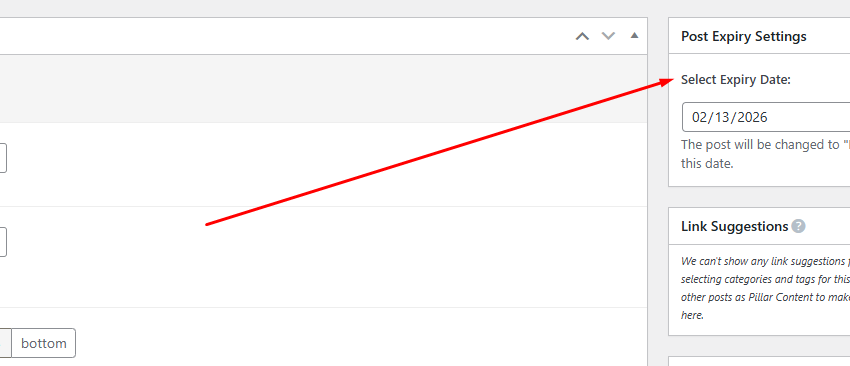
Inside the post editor sidebar, you’ll find the Post Expiry Settings panel. With just a few clicks, you can select an expiration date for any post.
This makes it one of the most user-friendly auto draft WordPress plugin solutions available.
2. Automated Hourly Background Process
The plugin schedules an hourly WordPress cron job to check for expired posts.
Once the expiry time is reached:
-
The post status automatically changes to Draft
-
The content remains safe in your dashboard
-
The post is no longer publicly visible
This seamless post scheduler WordPress functionality eliminates the need for manual updates.
3. Lightweight and Performance-Focused
Unlike bulky automation tools, MT Simple Post Expiry is built following WordPress coding standards. It avoids unnecessary scripts and keeps your website fast.
Because it’s optimized for performance, it works perfectly alongside caching plugins and other performance tools.
4. Secure and Reliable
Security is essential in any WordPress plugin development project.
MT Simple Post Expiry includes:
-
Proper nonce verification
-
User capability checks
-
Clean and sanitized input handling
This ensures secure operation without compromising your website’s integrity.
5. Translation Ready
Running a multilingual site? No problem.
The plugin is fully compatible with translation tools and follows WordPress internationalization standards, making it ideal for localized websites.
Why You Need a Post Expiry Plugin
Many WordPress users overlook the importance of automatic post expiration.
Here’s why using MT Simple Post Expiry improves your workflow:
-
Keeps outdated content off your live site
-
Improves website content management
-
Maintains professional brand image
-
Prevents expired promotions from confusing users
-
Supports clean WordPress blog management
Instead of manually switching posts to draft, let automation handle it.
How MT Simple Post Expiry Works
The process is simple:
-
Install and activate the plugin.
-
Edit any standard WordPress post.
-
Select an expiry date in the sidebar.
-
Save or publish the post.
Behind the scenes, the plugin registers a scheduled WordPress cron event that runs hourly. When a post reaches its expiration time, its status changes to Draft.
This makes it an efficient WordPress auto draft plugin solution for time-sensitive publishing.
Who Should Use MT Simple Post Expiry?
This plugin is perfect for:
-
Bloggers managing seasonal content
-
Businesses running limited-time offers
-
News websites publishing temporary announcements
-
Affiliate marketers promoting time-based deals
-
Event organizers sharing date-specific updates
If you regularly publish time-sensitive posts, MT Simple Post Expiry is a must-have WordPress automation plugin.
Compatibility and Requirements
-
Requires WordPress 6.0 or higher
-
Tested up to WordPress 6.9
-
Requires PHP 7.4 or higher
-
Built for standard “Posts”
Currently, it does not support custom post types, but future updates may expand compatibility.
Frequently Asked Questions
Does it support custom post types?
At this time, MT Simple Post Expiry works specifically with standard WordPress posts.
How often does it check for expired posts?
The plugin schedules an hourly WordPress cron scheduler event.
What happens when a post expires?
The post automatically changes to Draft status. It is no longer publicly visible but remains safely stored in your dashboard.
Benefits for SEO and Website Maintenance
While the plugin’s primary purpose is automation, it also supports better SEO indirectly:
-
Prevents outdated content from harming credibility
-
Reduces bounce rate caused by expired offers
-
Improves overall website maintenance workflow
-
Keeps your site content fresh and relevant
Fresh content signals help maintain trust and authority.
Final Thoughts
If you want a simple, secure, and lightweight solution for managing time-sensitive posts, MT Simple Post Expiry is the perfect plugin.
It removes manual effort, enhances content organization, and keeps your WordPress site clean and professional.
Whether you’re running a blog, business site, or promotional platform, automating post expiration saves time and reduces mistakes.
Install MT Simple Post Expiry today and simplify your WordPress content workflow. 🚀

February 12, 2026